

What is a Phone Card ICCID? How to Check eSIM Numbers on iPhone and Android (Applies to LuckySIM Transfer and Top-Up Tutorials)
When using a phone card (SIM card or eSIM), the ICCID number is essential for transfers, top-ups (recharging), or customer service inquiries. Taking 1worldsim.com and LuckySIM as examples of phone card services, users typically need to provide the ICCID for identification when transferring an eSIM or topping up. Therefore, knowing how to quickly find your ICCID is crucial.
What is an ICCID Number? (SIM Card Serial Number Explained)
ICCID (Integrated Circuit Card Identifier) is the globally unique identification code for each SIM card, usually consisting of 18 to 22 digits, akin to the phone card's "ID card."
Its primary uses include:
- Identifying the SIM card and user identity
- Processing card transfers (e.g., changing devices or SIMs)
- Phone card top-ups/recharges
- Customer service inquiries and troubleshooting
In other words, the ICCID is one of the core pieces of information for managing phone card services (such as LuckySIM).
How to Find Your ICCID: Three Common Methods
Method One: Check the Physical SIM Card
The simplest way is to check the SIM card itself or its original packaging:
- The ICCID is usually printed on the back of the SIM card or its packaging.
- Some nano SIMs may only display a partial number.

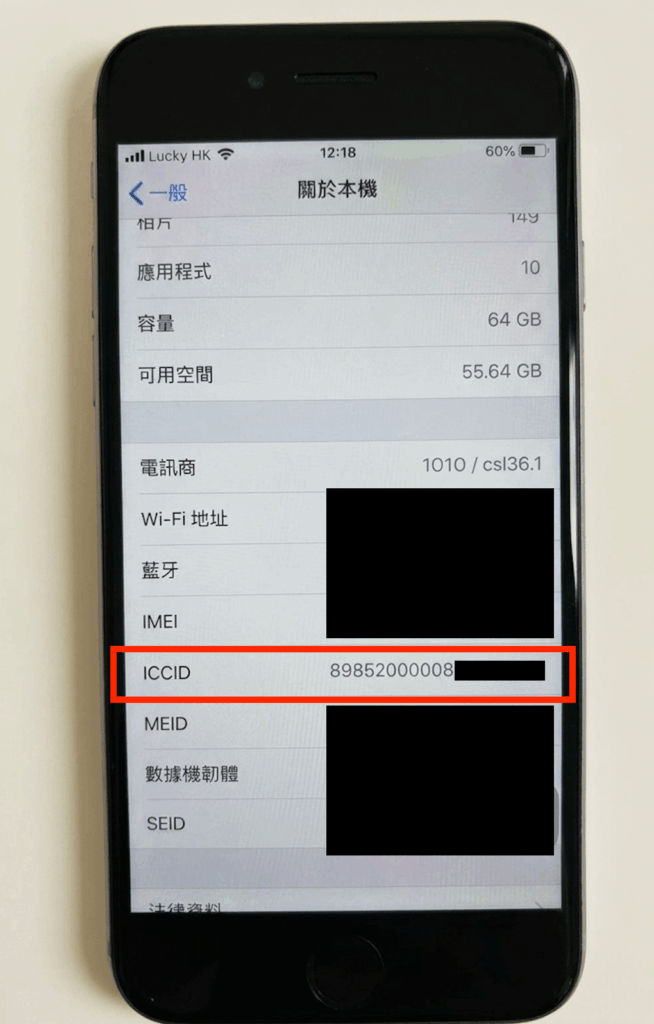
Method Two: How to Find ICCID on iPhone
Applicable to all iOS devices (including eSIM):
- Open "Settings"
- Tap "General"
- Select "About"
- Scroll down to find "ICCID"
This method can display the ICCID for both physical SIM and eSIM.

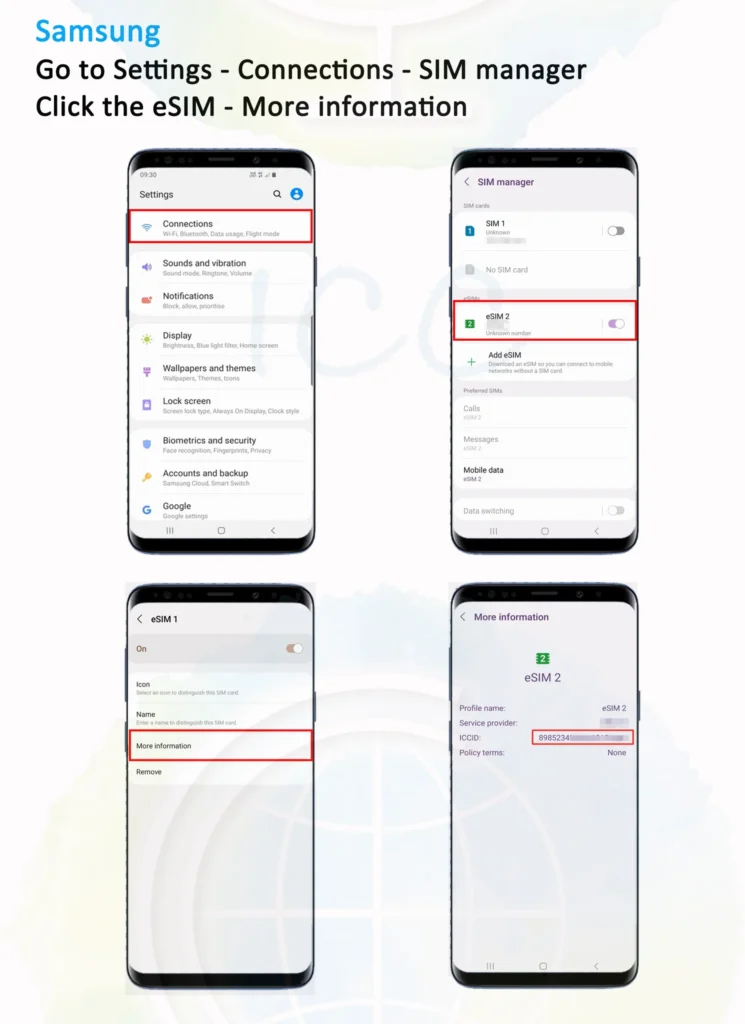
Method Three: How to Find ICCID on Android
Steps may vary slightly by brand, but generally:
- Open "Settings"
- Go to "About phone"
- Tap "SIM status" or "SIM management"
- Look for "ICCID" or "SIM serial number"
Some Android versions may require going into "SIM management" or searching for "SIM" as a keyword.
LuckySIM Use Cases: Why is ICCID Essential?
For LuckySIM or other international phone cards, ICCID is commonly used in the following scenarios:
1. Card Transfer (Changing Phones/Devices)
When users change phones or re-insert their SIM, the ICCID is needed to confirm the SIM's identity and ensure the number is transferred correctly.
LuckySIM eSIM transfer details: https://1worldsim.com/zh-hant-cn/products/lucky-sim-esim-replacement
2. Top-up (Recharging Data or Calls)
During a top-up, the system uses the ICCID to identify the corresponding SIM card, preventing incorrect recharges.
- LuckySIM Hong Kong Data: https://1worldsim.com/products/lucky-sim-topup
- LuckySIM Roaming Data: https://1worldsim.com/products/lucky-sim-topup-roaming
- Lucky2 Hong Kong Data: https://1worldsim.com/products/lucky2-topup-hkdata
- Lucky2 Roaming Data: https://1worldsim.com/products/lucky2-topup-global-roamingdata
3. Customer Support and Troubleshooting
If you encounter internet issues or no signal, customer service will usually ask for your ICCID for verification.
Common ICCID Questions
Q: What's the difference between ICCID and IMEI?
A: ICCID is the SIM card number; IMEI is the mobile device number. They are completely different.
Q: Does an eSIM have an ICCID?
A: Yes, an eSIM also has an ICCID, which can be found in your phone settings or email.
Q: What happens if I enter the wrong ICCID?
A: It may lead to failed top-ups or incorrect card transfers. It's recommended to copy and paste to avoid input errors.