
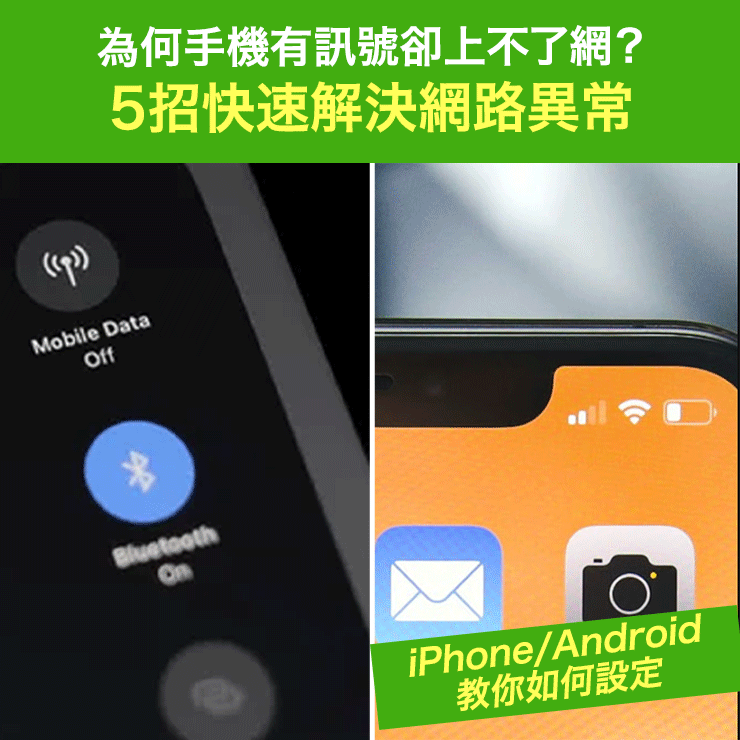
Why can't my phone connect to the internet even though it has a signal? 5 quick ways to fix iPhone/Android network problems.
When your phone shows a full signal (but cannot connect to the internet), it may be due to environmental issues, abnormal hardware or software settings, or even problems with your eSIM/SIM card or carrier settings. Below are five common causes and practical settings for iPhone/Android phones to help you quickly troubleshoot and restore smooth network connectivity.
Latest online store promotion for fans! Starting today, enter the promo code "Travel" on your first payment at http://1worldsim.com , and you'll enjoy 5% off your next purchase of HK$100 or more!
Major brands of SIM cards for Hong Kong, Macau, and mainland China, as well as global travel cards and eSIMs, are now available. LuckySIM also offers services such as number portability to Taiwan for $138 for 3 years, and number retention. Don't miss out!
Common Cause Analysis
- Base station malfunction or under repair <br />Even if your phone shows a signal, mobile data may still be interrupted and you will not be able to access the internet if the nearby base station is under repair or malfunctioning.
- Insufficient network coverage <br />Signal may be unstable in remote areas, inside buildings, elevators, or basements. Even if the signal appears full, the actual network connection may be interrupted.
- iOS or carrier settings update issues <br />Outdated or outdated system or carrier settings may cause connection problems. We recommend checking for available updates.
-
Poor contact, dirt, or aging of the SIM card
Dust or oxidation on the SIM card may cause abnormal signal reading and data transmission, making it impossible to use mobile data even if a signal is displayed. -
5G baseband receiver issue (Apple iPhone only)
Some iPhone users have reported that when they have a full 5G signal but cannot access the internet, switching to 4G or restarting airplane mode can restore the network, which is speculated to be related to the 5G receiver or software.
Five practical solutions
Method 1: Turn "Airplane Mode" on/off and reload the network connection.
This simple yet often effective method helps your phone re-search for the best connection point by disconnecting and reconnecting to all wireless services (including mobile data, Wi-Fi, and Bluetooth). It's recommended to enable airplane mode in the control center, wait a few seconds, and then turn it off to restart your network connection.
Method 2: Restart mobile data (re-enable mobile network service)
Turn off "Mobile Data" in your phone settings, wait about 10 seconds, and then turn it back on, making sure the network type is set to "4G". This action can refresh the connection with the base station and improve stability.
Method 3: Restart your phone
Shutting down and restarting can release system resources and clear temporary files, which is often effective for internet access problems caused by software errors. If your device has a Home button, press and hold the power button to shut down, then press the power button again to turn it on; if your device does not have a Home button, press and hold both the volume buttons and the power button, then slide to shut down, and then turn it on again.
Method 4: Check and clean the SIM card to ensure good contact.
Remove the SIM card tray, gently wipe the card surface with a clean cotton cloth to remove dust, and then reinsert it, ensuring it is oriented correctly. If there are signs of damage or oxidation, contact your telecommunications provider to replace the SIM card.

Method 5: Check your telecom provider's settings or system updates.
Go to "Settings" > "General" > "About" and wait a few minutes to check for any settings update prompts from your mobile carrier. Also, make sure your iOS is the latest version. If an update is available, install it immediately to ensure compatibility and security with your mobile network settings.
Further suggestions and summary
- If you are using an iPhone and have enabled 5G, but are repeatedly experiencing full signal strength but unable to connect to the internet, it is recommended that you temporarily switch to 4G for testing to avoid potential instability issues caused by the 5G baseband.
- If the above methods still do not solve the problem, it is recommended to contact the telecommunications operator to confirm whether there is an account problem, base station maintenance, or equipment replacement required.
in conclusion
If your phone shows a full signal but you can't connect to the internet, it's usually not a complete hardware failure. Instead, it's often caused by incorrect settings, network changes, poor SIM card contact, or 5G reception issues. Five steps—resetting to airplane mode, restarting mobile data, checking your SIM card and system updates—can help you quickly identify the cause and restore your network connection.
Other articles: Lucky SIM - Number Portability and Number Retention
Many people still keep their Hong Kong phone numbers, and the "$138 3-year" plan is the top choice for number portability! Besides free SMS in Hong Kong and overseas, it also includes 15GB of Hong Kong data, all at the same price. The other 13 portability plans offer even greater increases in Hong Kong data!
All data transfer plans and roaming data for 17 countries can be upgraded/renewed later. Whether you are in Hong Kong or overseas, you can purchase more data as needed and never have to worry about running out of data.
Lucky SIM SIM cards are compatible with various phone models, including physical cards and eSIM-enabled phones. Whether you are in Hong Kong or overseas, you can apply for a transfer using the official authorization form below, and an officially authorized agent will contact you.
Google Form application form: https://forms.gle/tY7vCdDgRFTYZd616 (Physical SIM card or eSIM optional)
Article details: https://stepstepinfo.com/?p=2694
Official authorized distributor BBK.com is offering priority sales of all LuckySIM and Lucky2 eSIM models. Please refer to the order form for pricing: https://bit.ly/4cTV8VH

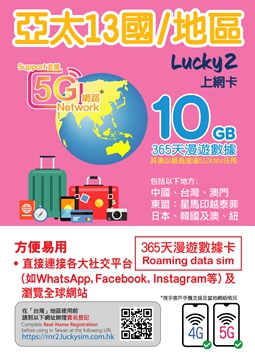
Lucky2 13 countries/regions 365 days 10GB Unlimited Data Card
This annual data plan offers 365 days of roaming data service, with the first 10GB being high-speed data. After that, you can continue to use unlimited data at a reduced speed of 512kbps for browsing news, watching videos (low definition), or contacting friends and family via WhatsApp. A best-selling option, this is a rare affordable annual data plan on the market! Real-name registration is not required in Taiwan.
Internet provider:
China Unicom
Macau CTM
Taiwan Mobile
Japan SoftBank/KDDI
South Korean KT/SKT
Singapore Telecom
Maxis Malaysia
Telkmosel Indonesia
Vietnam Mobifone
Thailand AIS
Globe Philippines
Optus Australia
New Zealand TNZ
When data usage reaches 10GB, the speed is reduced to 512K for unlimited internet access.
Lucky2 365-day 30GB Unlimited Data Card for China, Japan, South Korea, Taiwan, and Macau
The best-selling model, a rare find in the market for affordable Japanese annual data plans! First 30GB of high-speed 5G/4G, then unlimited internet at 512K speed, plus an additional 5GB of Hong Kong data.
In Hong Kong and Taiwan, real-name registration is required, but only one registration is needed for use in these two places. Real-name registration is not required in China, Macau, Japan, or South Korea.
If users have purchased but not yet activated their cards before the upgrade, they can immediately enjoy the newly upgraded data plan, which is a very convenient option for frequent travelers.
- The first 30GB or more of speed, with subsequent speeds up to 512Kbps, is provided by China Unicom.
Taiwan CHT/ Taiwan mobile
Macau CTM
JapanSoftbank/KDDI
South Korean KT/SKT
Also includes 5GB of Hong Kong data.

Official authorized distributor BBK.com is giving priority to selling all LuckySIM and Lucky2 eSIM models. Please refer to the order form for pricing: https://bit.ly/4cTV8VH